Building large reports became challenging
As agencies created larger reports with more pages, the report editor became harder to use. The left navigation only showed page thumbnails, so users had to switch back to the canvas to rename, duplicate, delete, or reorder pages, making report management slower and less efficient.
Adding new pages was also time-consuming. If users wanted to include another report page later, they had to create it from scratch because there was no Page Gallery or reusable templates. On top of that, many of the existing report and page templates looked outdated and lacked a clean, modern design, making it harder for agencies to create polished client reports quickly.
Understanding how agencies build reports
I reviewed the existing report editor, conducted user research with agencies, and analyzed how they created reports in their day-to-day workflow. A few pain points came up repeatedly.
The page list only showed thumbnails, making it hard to manage large reports.
No way to group related pages together.
Reordering many pages was difficult.
No Page Gallery to insert ready-made page templates.
No option to save custom pages as reusable templates.
No way for saving and reusing multi-page templates.
The existing report and page templates looked outdated.
Agencies repeated the same setup work for every new client report.
Common actions like rename, duplicate, and delete weren't easily accessible from the page list.
A pattern across the research
Most agencies wanted to create reports faster with less repetitive work. They also wanted better organization, reusable templates, and the flexibility to save or export selected pages for future reports.
What Made This Project Challenging
Supporting existing reports
The new experience had to work with thousands of existing reports without breaking them. Imported templates also needed to automatically match each report's existing theme.
Shipping everything together
The Page Gallery, left navigation, page management, reusable templates, and 200+ refreshed templates all had to launch in a single release.
Learning a new product and team
As my first project at ReportGarden, I had to quickly learn the product, understand the engineering workflow, and collaborate with a new team while delivering the project on time.
Refreshing 200+ templates
We redesigned more than 200 report and page templates with a cleaner, more modern look while keeping the entire template library consistent.
Keeping the workflow fast and flexible
The new experience needed to help users quickly find, import, organize, group, and save pages without making the workflow more complex.
How we got here
Audit & Competitive Analysis
Went through the existing editor screen by screen, cataloged every page action and dead end, and looked at how a handful of competing report builders handled navigation and template galleries.
Agency Interviews
Sat with agency teams managing 15–30 page reports to understand how they actually built and maintained them day to day.
Concepts & Design Reviews
Explored a few directions for the navigation and gallery, then reviewed them with PMs and engineers to find what was realistic in one release.
High-Fidelity Design
Translated the validated direction into detailed Figma designs, covering every page state, menu, and empty state.
Prototype Testing
Built interactive prototypes in FigJam and Figma to walk agencies through the new flows before development started.
Developer Handoff
Worked closely with engineering to sequence the release, figuring out what could ship first and what each piece depended on.
The redesigned report editor
Fresh Report Templates
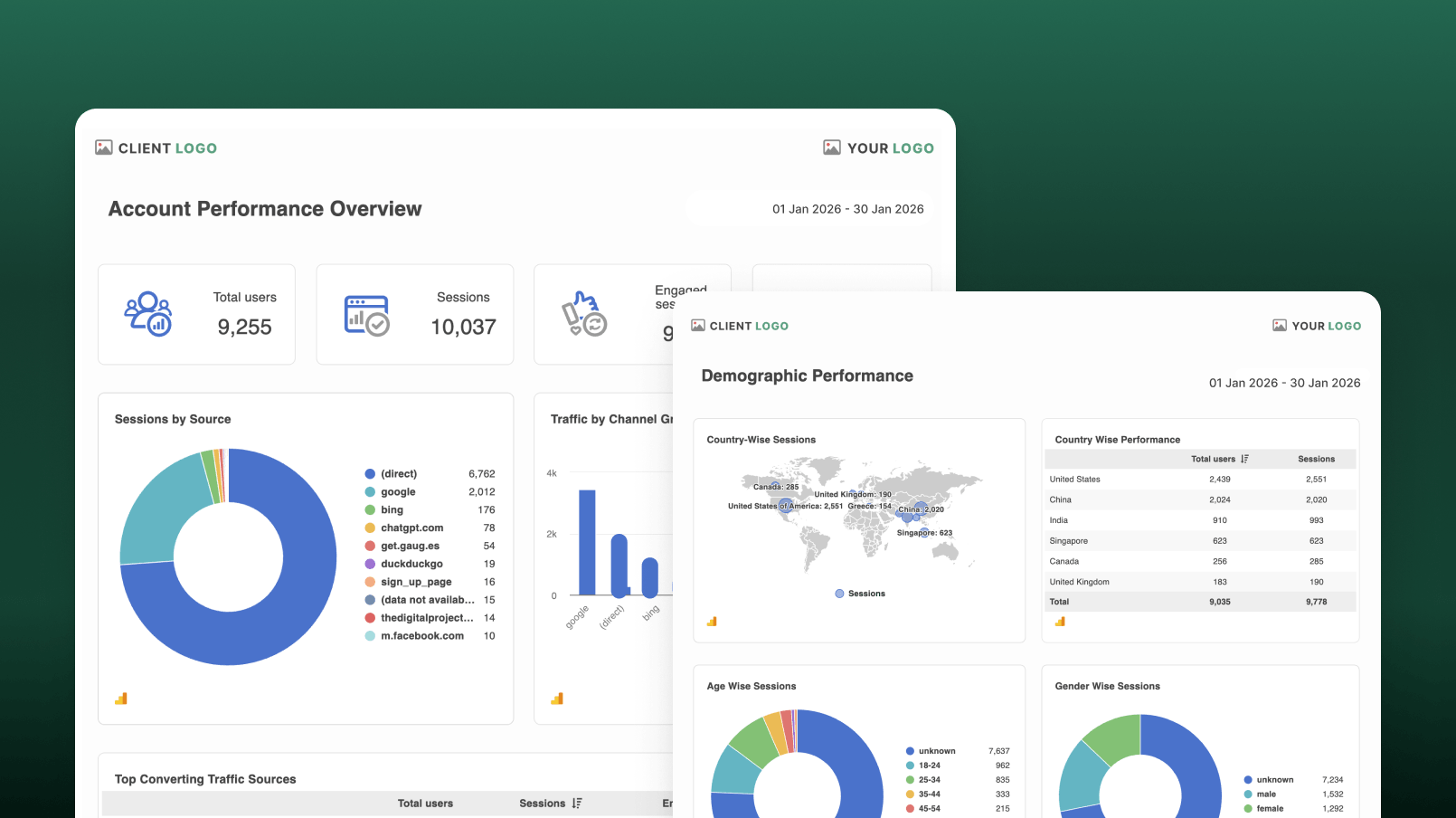
Every report starts with a template, so it needed to make a great first impression. I refreshed the report and page templates with a cleaner layout, modern visuals, and improved spacing to help agencies create professional-looking reports.
A New Page Gallery
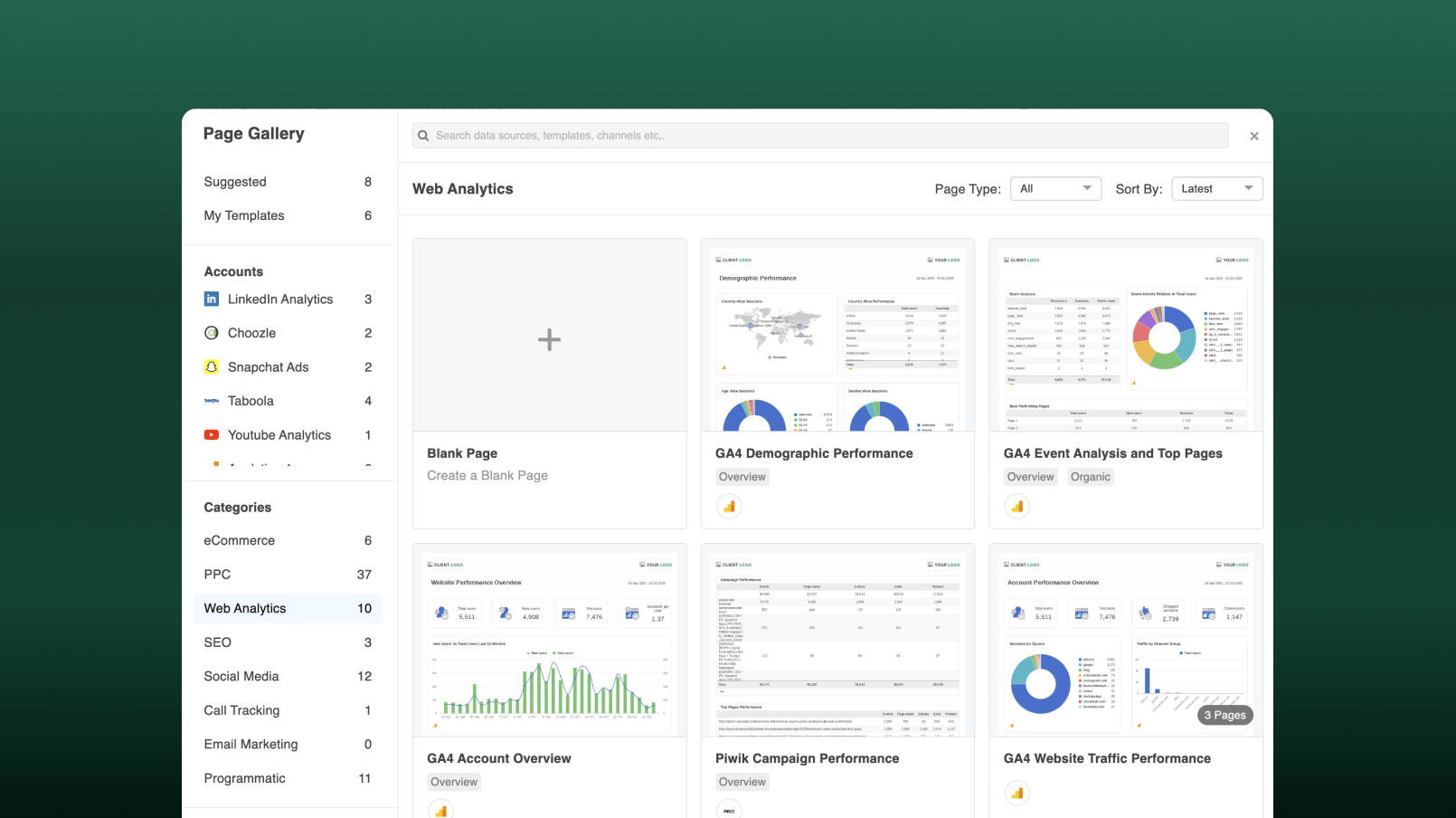
Instead of creating pages from scratch, users can now choose from a Page Gallery organized by categories like Web Analytics, PPC, eCommerce, and Social Media. They can also browse templates based on the data sources connected to their account. Custom pages and multi-page templates can be saved in My Templates and reused in future reports.
Left Navigation & Page Management
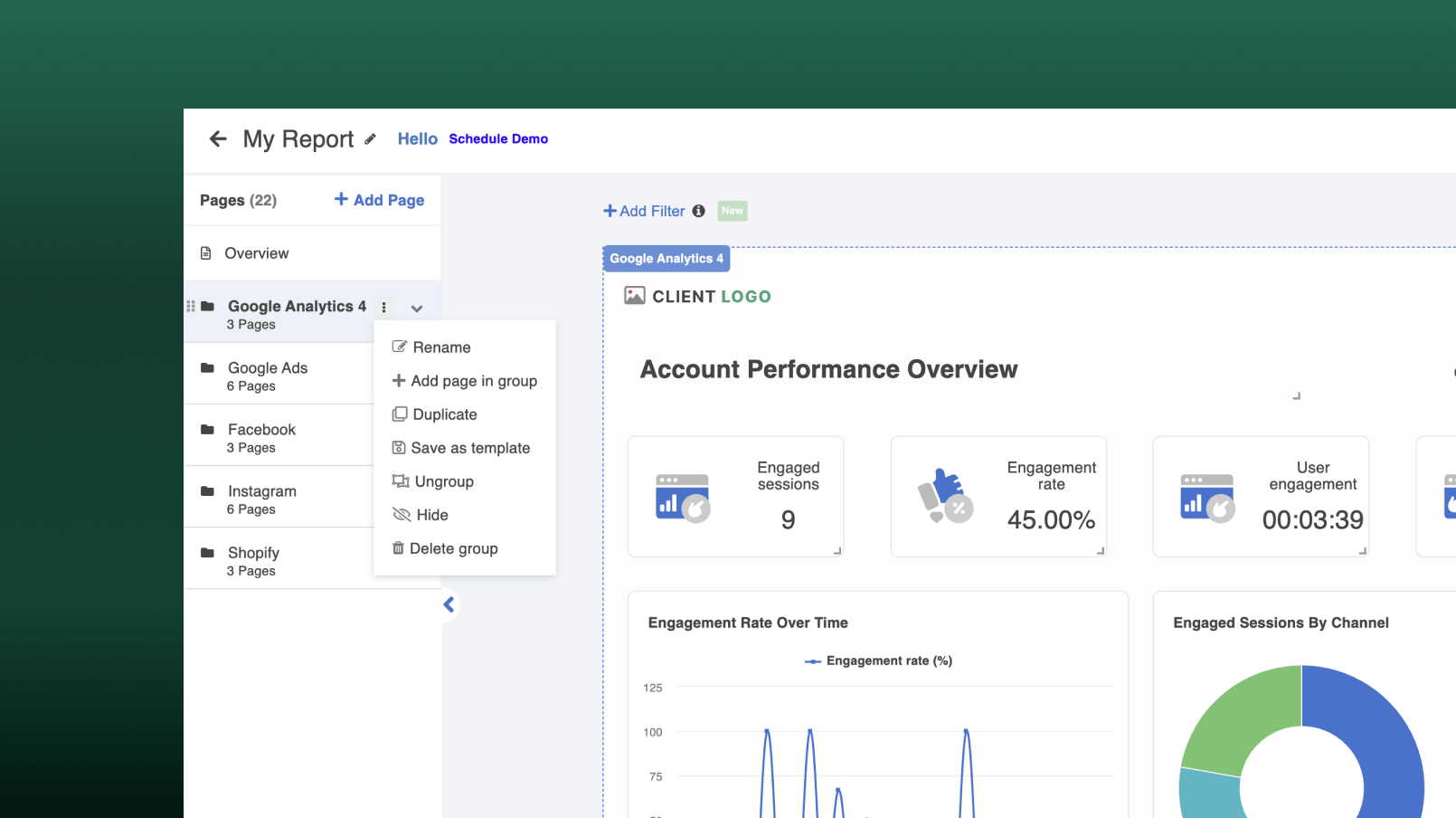
Long reports used to be hard to navigate. There wasn't a clear, persistent way to see every page or move between them. The new left navigation lists every page, shows how pages are grouped by data source, and gives each page its own menu to rename, duplicate, hide, delete, or save as a template, all without leaving the current page.
What changed for agencies
Before
- Every new page had to be created from scratch
- Report and page templates looked outdated
- The left navigation only showed page thumbnails
- Page management actions weren't easily accessible
- Agencies repeated the same work for every client report
After
- Ready-made page templates organized by category
- Refreshed report and page templates with a modern design
- A redesigned left navigation with page grouping
- Rename, duplicate, hide, delete, and reorder pages from one menu
- Save and reuse pages or page groups across future client reports
What I learned from this project
Design for future growth
Building a strong foundation made it easier to add new features without redesigning the workflow again.
Collaboration matters
Working closely with product managers, engineers, and agency users helped turn complex requirements into simple solutions.
Reduce repetitive work
Small improvements like reusable templates, page grouping, and the Page Gallery can save users a significant amount of time.
Consistency improves usability
Refreshing 200+ report templates created a cleaner, more consistent experience across the product.
Ship meaningful improvements together
Launching the entire workflow in a single release delivered a complete experience instead of a collection of disconnected features.